General information:
- Secure SSL/TLS Settings (~)
Username: ~your email address~
Password: Use the email account’s password.
Incoming/Outgoing Server:
(IMAP Port: 993, POP3 Port: 995, SMTP Port: 465)
Authentication is required for IMAP, POP3, and SMTP.
–
- Non-SSL Settings (for common client settings)
Username: ~your email address~
Password: Use the email account’s password.
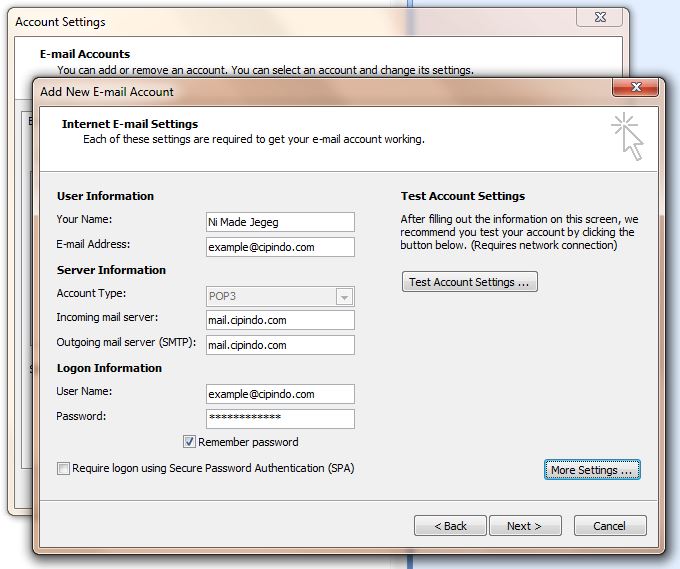
Incoming/Outgoing Server: mail.cipindo.com
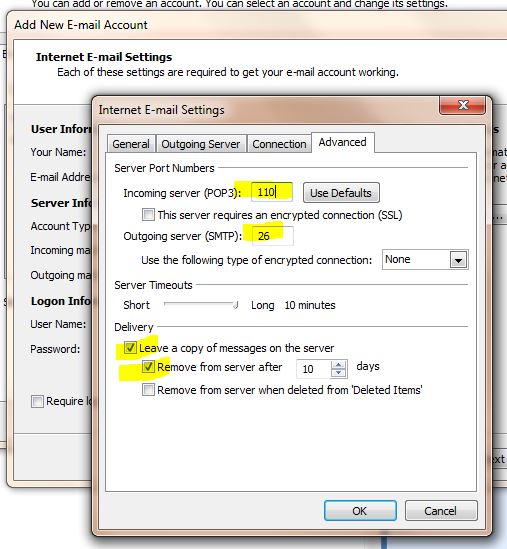
(IMAP Port: 143, POP3 Port: 110, SMTP Port: 587/2525/26)
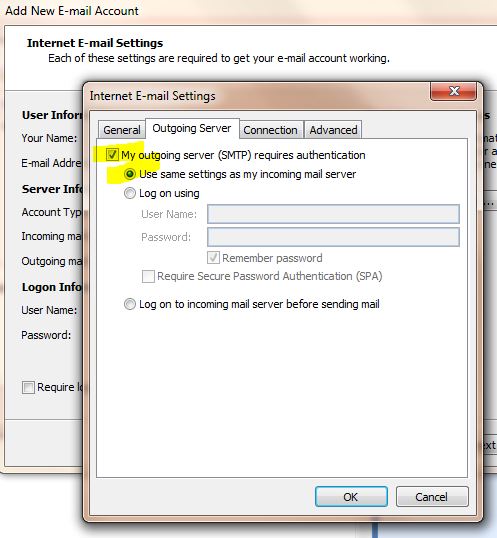
Authentication is required for IMAP, POP3, and SMTP.
–
- Webmail Access:
http://webmail.cipindo.com
.
- Email client settings (Microsoft Outlook)
– Outlook 2007, Tools > Account Settings…
– Outlook 2010/2013, File [tab] > Account Settings…
– Setup your email manually when setup wizard pops up.
– Please setup your email as “POP” or “POP3”, and following example Non-SSL setting screen will give you completed information:
– Once it all completed, click OK, Next or Close on the way out back to Outlook main screen.
Sanur – Bali, Indonesia